Projects

Timestamp Conversion Tool

A small but complete frontend tool inside Labs

Status
Live
Type
Frontend Tool
Updated

An interactive tool for converting timestamps, date formats, and timezone information, showing how Labs can host directly useful utilities.

Verifiable entry points

Demo and source

Public demo

Convert dates and seconds or milliseconds in the browser, then compare local time with UTC.

Open the timestamp tool

Source evidence

Review conversion, timezone display, live refresh, and the Clipboard fallback.

Evidence

Live entry

The tool is accessible as part of the Labs page

Browser capability

The JavaScript Date API handles date and local / UTC display

Template value

Input, validation, result, and copy feedback can be reused by future small tools

Asset status

Only repository-backed product mocks, public documentation, or an explicit no-public-image explanation appear here.

Asset type: Screenshot
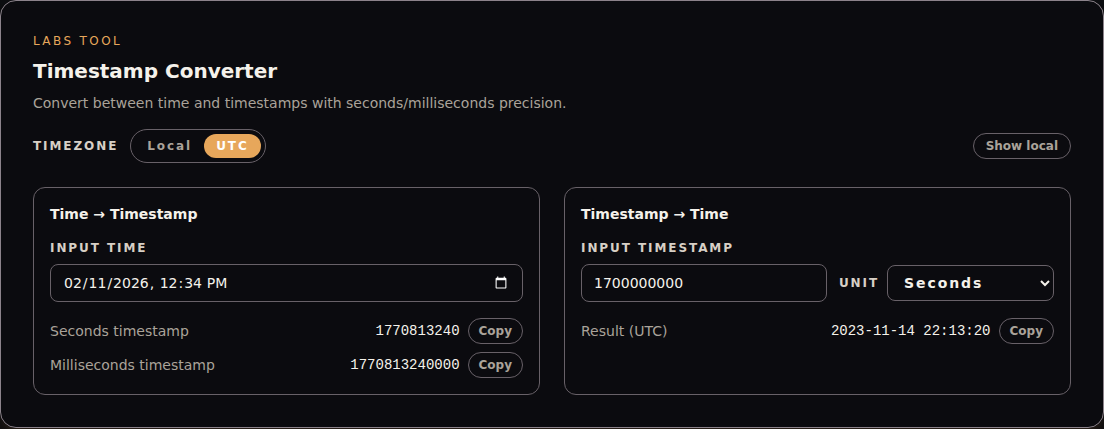
Screenshot
Current public Timestamp Tool interface showing a fixed date input, second and millisecond results, and a UTC timestamp conversion
Real interface capture generated by browser acceptance with fixed inputs; the dynamic current-time panel is hidden and no account or private data is included.

Asset type: Documentation

Read the implementation retrospective

This published article records decisions around timezone display, seconds and milliseconds, copy feedback, and input boundaries.

Read the implementation retrospective

Problem

Development and debugging often require quick timestamp conversion, but many tools are noisy, weak on feedback, and hard to fit into a personal workflow.

Solution

Put common conversions, copy feedback, and boundary hints into one lightweight page that can become a template for future Labs tools.

My role

  • Frontend implementation
  • Input validation
  • Interaction feedback
  • Labs integration

Stack

  • React
  • TypeScript
  • Tailwind CSS
  • JavaScript Date API

Highlights

  • Immediately usable
  • Complete interaction feedback
  • Reusable as a future tool template

Architecture

The tool uses a client component for input, conversion, validation, and feedback state. It relies on the JavaScript Date API for date and local / UTC formatting, with no backend service required.

  1. Step 01

    Browser input

    Accept a date-time or numeric timestamp with an explicit seconds or milliseconds unit.

  2. Step 02

    Date conversion

    Convert between time and Unix timestamps while rejecting invalid dates and non-finite numeric input.

  3. Step 03

    Local and UTC display

    Format the same instant using local or UTC fields, with an optional comparison line.

  4. Step 04

    Copy feedback

    Use the Clipboard API first and fall back to a temporary textarea when needed.

Key decisions and impact

  1. Decision 01

    Make seconds and milliseconds an explicit choice

    Rationale
    Ten- and thirteen-digit timestamps are easy to confuse, while implicit guessing can produce hard-to-spot date errors.
    Impact
    Input needs one more choice, but precision stays clear and verifiable.
  2. Decision 02

    Offer local and UTC views of the same value

    Rationale
    A timestamp is timezone-independent; ambiguity usually comes from how that instant is displayed.
    Impact
    Conversion logic stays simple while users can inspect both representations when needed.
  3. Decision 03

    Keep every calculation in the browser

    Rationale
    Date conversion and copying need neither a server nor persisted user input.
    Impact
    The tool opens with no API cost, but it does not yet cover batch or persisted workflows.

Trade-offs

  • A single client-side tool opens quickly, but it is not designed for batch or persisted workflows.
  • The first version covers common timestamp needs instead of adding timezone databases and complex calendar rules.
  • Keeping it lightweight avoids pulling a shared form framework into one small Labs utility.

Roadmap

  • Add batch conversion
  • Support more timezone comparisons
  • Extract shared Labs tool page components

Current limitations

  • Currently focused on timestamps only
  • No batch conversion yet

Next steps

  • Add batch input
  • Support more timezone comparisons
  • Extract shared tool-page components

Keep exploring

Related entry