A small tool exposes large time assumptions
Timestamp conversion looks like a formatting task: accept a number, construct a Date, and print a readable value. The difficult part is not the arithmetic. It is making unit, timezone, input meaning, and failure behavior visible enough that a plausible-looking result does not hide a mistake.
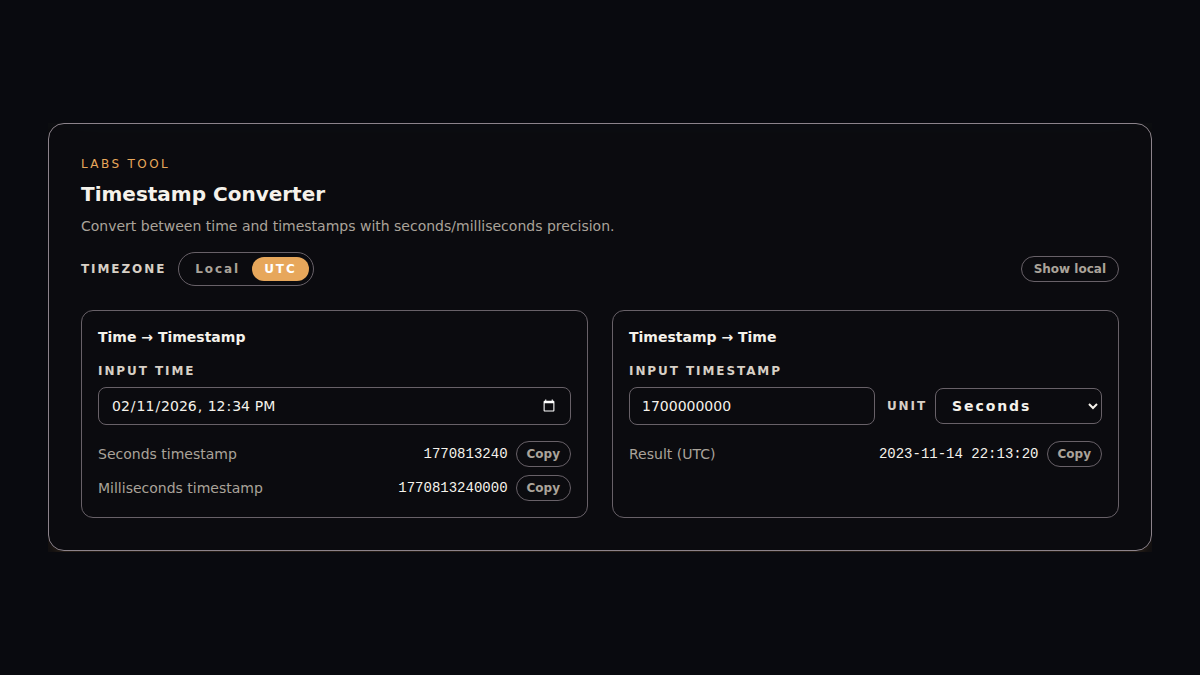
The Timestamp Converter in this site is intentionally small. It runs entirely in the browser and covers two directions:
- a
datetime-localvalue to seconds and milliseconds - a numeric timestamp to a readable local or UTC time
The implementation is public in apps/website/app/labs/timestamp-tool.tsx. This retrospective describes that current code. It does not claim batch processing, named timezone conversion, persistence, or server-side validation that the tool does not have.
Scope: one component and no backend
The component owns its inputs, conversion results, timezone display mode, current-time ticker, and temporary copy state. No value is submitted to an API or written to storage. That keeps the privacy and deployment boundary easy to explain: input remains in the active browser tab.
On mount, the component initializes the date input and current timestamp from the browser clock. A one-second interval refreshes the current-time panel, and the cleanup function removes that interval when the component unmounts. This is enough for a live reference without introducing a shared clock service.
The UI uses locale-specific copy from the site's client language context. Route locale still decides whether the surrounding Labs page is Chinese or English; the tool uses the same locale to select labels and feedback.
Decision 1: make precision a user choice
A ten-digit Unix value usually represents seconds, while a thirteen-digit value usually represents milliseconds. Guessing from length is convenient until an unusual value, pasted whitespace, or future date crosses the heuristic boundary.
The tool does not guess. Timestamp-to-time conversion has an explicit unit state:
type TimestampUnit = "seconds" | "milliseconds";

const milliseconds =
  timestampUnit === "seconds" ? numeric * 1000 : numeric;
Time-to-timestamp conversion displays both outputs from the same Date: Math.floor(milliseconds / 1000) for seconds and the original millisecond value beside it. Users can compare the two representations instead of relying on a hidden convention.
The tradeoff is one additional control. For a debugging utility, that small interaction cost is preferable to silently returning a date roughly fifty thousand years away from the intended result.
Decision 2: separate the instant from its display
A Unix timestamp represents an instant. Local time and UTC are two displays of that instant, not two different timestamps.
The component keeps that distinction visible. timeZoneMode selects local or UTC as the primary formatted line. A secondary-line toggle can show the other representation at the same time. Formatting reads either local date fields or their getUTC* equivalents from one Date object.
This solves a common inspection task: confirm that a backend UTC value maps to the expected local wall time without opening a second converter.
There is an important input boundary. The browser's datetime-local control does not carry a timezone. new Date(dateInput) interprets that value using browser-local semantics. Switching the result display to UTC changes how the resulting instant is shown; it does not reinterpret the original input as UTC. The interface is useful for local debugging, but it is not a replacement for an IANA timezone-aware scheduling form.
Decision 3: keep validation close to conversion
The timestamp input is trimmed and converted with Number. Non-finite values are rejected before constructing a Date, and Number.isNaN(date.getTime()) rejects invalid dates. Empty or invalid input produces no conversion result.
That boundary prevents NaN, Infinity, and invalid Date objects from reaching the formatter. It does not yet explain why a value failed. The current interface shows an em dash for an unavailable result instead of distinguishing an empty field, a non-numeric value, or an out-of-range date.
That is a deliberate first-release tradeoff rather than a finished validation experience. A stronger next pass should add inline error copy and connect it to the corresponding input with accessible description attributes.
Decision 4: copy where the value appears
Each generated value has an adjacent copy action. The component first attempts navigator.clipboard.writeText. If that API is unavailable or rejects the request, it falls back to a temporary read-only textarea and document.execCommand("copy").
Successful copying changes the button label for 1.5 seconds. The timer is cleared before a new one is created and during unmount, which avoids stale updates after the component leaves the page.
The fallback checks the boolean returned by document.execCommand("copy") instead of treating every call as success. If both clipboard paths fail, the adjacent action reports “Copy failed”; a polite live region mirrors the result for assistive technology. The feedback remains intentionally short-lived and does not store the copied value.
What the implementation gets right
Several choices make the current tool reliable enough for its stated scope:
- Seconds and milliseconds remain explicit at input and output boundaries.
- Local and UTC labels are visible instead of implied.
- The same instant can be inspected in both displays.
- Empty, non-finite, and invalid date results do not reach formatting code.
- Conversion and copying remain client-side, with no API cost or stored input.
- English and Chinese labels share one typed copy shape.
- The layout moves from two columns to a single column on narrower screens.
These are implementation facts visible in the repository. They are not usage or performance claims; the site does not publish conversion volume, completion rate, or latency telemetry for this tool.
Boundaries worth keeping visible
The current version is not a general time platform. Specifically:
- It accepts one value at a time.
- It supports local and UTC display, not arbitrary named timezones.
- It does not parse custom date formats.
- It does not persist history or encode values in the URL.
- It relies on the browser clock and JavaScript
Datebehavior. - It does not present detailed validation messages beyond the copy success/failure state.
- The live current-time panel makes a screenshot time-sensitive unless test data is fixed first.
Naming these limits matters because timestamp tools often look more capable than they are. A narrow, explicit contract is safer than adding heuristics that make ambiguous input appear valid.
The next useful iteration
The highest-value improvement is not another output format. It is clearer input feedback. Invalid numeric input and an invalid date should produce distinct, accessible messages instead of the same unavailable-result marker.
After that, two additions would extend the workflow without changing its local-first boundary:
- optional URL state for a reproducible single conversion, with a warning that the value becomes part of browser history
- batch input with per-row unit, validation, and copy status
Named timezone conversion should be treated as a separate feature because it requires a different input model and explicit daylight-saving-time behavior.
Continue reading
For the publication rules behind this article, read Blog Content Model: From Frontmatter to a Publishing State Machine.